
The Sinking Feeling of Losing Your Digital Life
Imagine sitting by the pool on a beautiful sunny afternoon. You are taking photos, enjoying the breeze, and laughing with your friends. Suddenly, a friend bumps your arm, and your expensive smartphone slips right out of your hand.
You watch in slow motion as it plunges deep into the water. Your heart immediately drops into your stomach. You quickly pull it out, wipe it off on your shirt, and press the power button, praying for the screen to light up.
Nothing happens. The screen remains completely black.
In that terrible moment, you are not thinking about the cost of the physical device. You are thinking about the irreplaceable memories trapped inside that tiny metal box. You realize that your child's first birthday photos, your important business contacts, and those unbacked-up travel videos might be gone forever.
The mental panic that sets in is incredibly overwhelming. You feel a heavy knot in your chest because your entire digital life was stored on that single device. We rely so heavily on our phones that losing access to them feels like losing a piece of our own brain.
If you are reading this right now with a wet phone sitting on your desk, take a deep breath. Your data is most likely still alive.
Water damage is incredibly scary, but it rarely destroys the actual memory chips immediately. The problem is simply that the pathway to your data is temporarily blocked. Today, I am going to walk you through the exact, science-backed steps to safely open those pathways and rescue your precious files.
The First 60 Seconds: Your Golden Window of Rescue
When electronics meet liquid, a very specific chemical reaction begins. Water itself is not the actual enemy of your data. The real danger comes from the microscopic minerals and salts hidden inside the water.
When these invisible minerals touch the copper pathways on your phone's logic board, they create tiny, unwanted bridges. If electrical power flows across these wet bridges, it causes a massive short circuit. A short circuit will instantly fry the memory chips holding your data.
This is exactly why your immediate actions dictate whether you will ever see your photos again. You have a very small window of time to stop the electrical current from destroying the board.
The Ultimate Rule of Wet Electronics
If your phone is still turned on when you pull it out of the water, turn it off immediately. Do not test the touchscreen. Do not check your notifications.
Press and hold the power button until the screen goes completely dark. If the phone is already off, absolutely do not try to turn it on.
We naturally want to check if the device still works. We think pressing the power button is a harmless test. In reality, pressing that button sends a fresh surge of electricity directly into a wet environment, which guarantees permanent data loss.
If your phone has a removable battery, pop the back cover off and pull the battery out right away. This completely kills the power source and instantly pauses any internal damage.
Stripping Down the Device for Maximum Airflow
Once the power is off, you need to open every possible door on the device. Your goal is to give the trapped moisture a clear escape route.
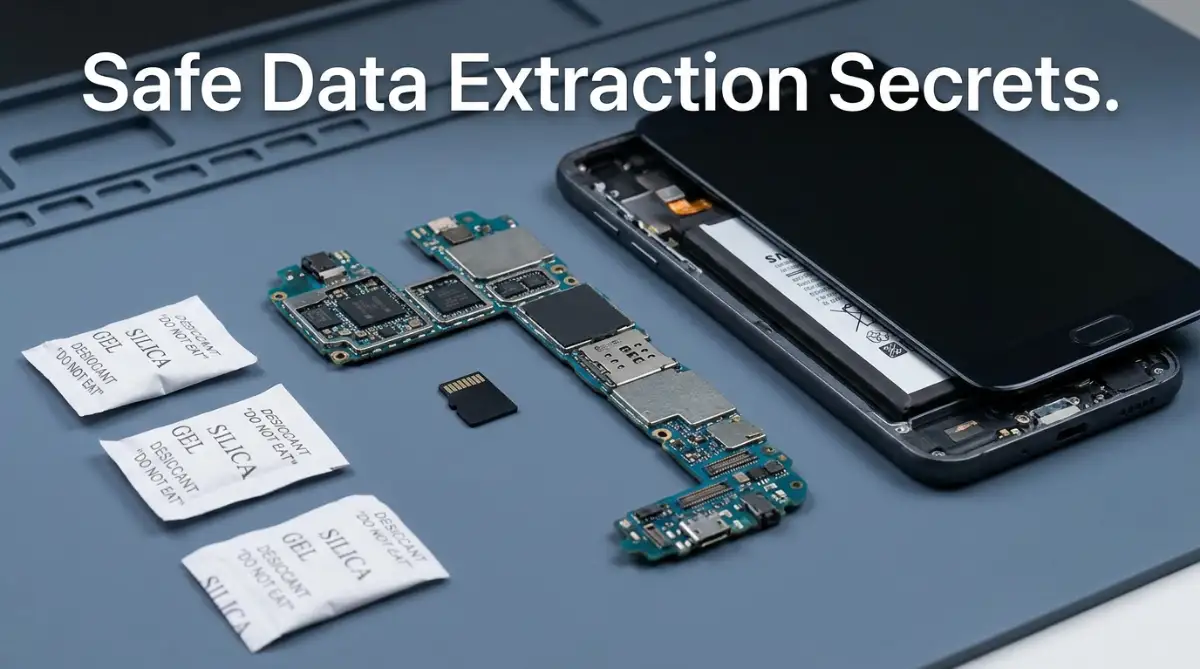
Remove your protective phone case immediately. Take a paperclip or a SIM ejector tool and pop out the SIM card tray. If your phone uses a Micro-SD memory card, remove that as well.
Pro Tip: Your Micro-SD card is highly water-resistant. If your photos were saving directly to this tiny plastic card, your data is probably already perfectly safe. Simply dry the card off with a soft towel, insert it into a laptop card reader, and copy your files over.
If your files were saved to the phone's internal memory, lay the empty device on a dry, lint-free microfiber towel. Do not shake the phone. Shaking it aggressively will just push the water deeper into the delicate speaker grills and charging ports.
Myth vs Reality: Why the Classic Rice Trick is a Dangerous Trap
If you ask anyone how to fix a wet phone, they will immediately tell you to drop it in a bowl of uncooked rice. This advice is repeated on television, in magazines, and all over social media.
I need you to completely forget this advice. Putting your wet phone in a bag of rice is one of the worst things you can do for data recovery.
Let us look at the actual science behind this popular myth.
The Myth: "Dry rice acts like a powerful sponge that pulls moisture out of the air and out of your device."
The Reality: While rice does absorb boiling water when you cook it, it is terribly inefficient at pulling cold water out of the air. It works far too slowly to stop the internal rusting process happening inside your phone.
But the real danger is the rice dust. Uncooked rice is covered in a fine, powdery starch. When you bury a wet phone in a bag of rice, this starchy dust enters the charging port and headphone jack.
When the starch mixes with the water inside your phone, it creates a thick, sticky paste. This paste hardens over the copper connectors, making it nearly impossible to extract your data later using a USB cable.
The Scientific Alternative to Rice
Instead of raiding your kitchen pantry, you need a true chemical desiccant. Desiccants are materials specifically engineered to aggressively absorb environmental moisture.
Remember those little white packets that come inside new shoeboxes or beef jerky bags? Those are filled with silica gel beads. Silica gel absorbs moisture thousands of times faster and more safely than rice.
If you want to create a safe drying environment, place your phone inside an airtight plastic container. Drop five or six silica gel packets into the box with the phone, and seal the lid tightly.
If you do not have silica gel, look for crystal cat litter in your garage. Crystal cat litter is made from the same moisture-absorbing silica material.
Leave the phone in this sealed, dry environment for a minimum of 48 hours. Patience is your strongest weapon right now. Opening the box too early will ruin the entire drying process.
The Chemical Rescue: Displacing Hidden Moisture
Sometimes, a phone gets dropped in a swimming pool full of chlorine, or a puddle full of muddy street water. In these cases, simply drying the phone is not enough.
Even if the water fully evaporates, it leaves behind a highly corrosive layer of mineral deposits. These minerals will eat through the metal pathways on the logic board over the next few weeks. Your data might survive today, but it will corrupt entirely next month.
To stop this hidden corrosion, professional repair technicians use a process called chemical displacement. They use a specific liquid to push the harmful water out of the device completely.
The Isopropyl Alcohol Bath
This sounds completely terrifying, but it is a proven scientific method. You can actually clean a water-damaged logic board using 99% pure isopropyl alcohol.
You must ensure it is exactly 99% pure. Standard rubbing alcohol from the pharmacy is usually only 70% alcohol and 30% water, which will just add more water to your phone.
Pure isopropyl alcohol does not conduct electricity. When you apply it to the internal parts of a phone, it actively binds with the trapped water molecules.
Because alcohol evaporates incredibly fast, it carries the water and the harmful minerals away into the air as it dries. It leaves the internal memory chips completely spotless and free of rust.
If you have the technical skills to open your phone's casing, you can gently scrub the logic board with a soft toothbrush dipped in 99% isopropyl alcohol. This simple cleaning step often brings a completely dead phone back to life just long enough to extract your photos.
Understanding Flash Memory and Data Corruption
To successfully rescue your files, it helps to understand where your data actually lives. Your photos and messages are stored on a tiny black square called a NAND flash memory chip.
Think of this memory chip like a massive library filled with millions of tiny books. When you take a photo, the phone writes a new book and places it on a specific shelf.
When water enters the phone, it rarely destroys the books themselves. The books (your data) are safely locked inside the waterproof plastic casing of the memory chip.
The water actually destroys the librarian. The "librarian" is the phone's operating system and the copper pathways that read the data.
Why Files Show Up as "Corrupted"
Sometimes, you manage to turn the phone back on, but your photos look distorted. Half of the picture might be covered in grey blocks, or a video refuses to play.
This happens when the phone tries to read the data, but the electrical pathway is slightly damaged by rust. The phone is essentially reading every third word of the book and guessing the rest.
This is a very good sign. It means your raw data is still sitting safely on the flash memory chip. You just need a cleaner, more stable connection to read it properly.
Do not delete these corrupted files. In the next phase, we will discuss exactly how to pull the raw, undamaged code directly from the memory chip to your computer.
If you can understand that your data is simply trapped rather than destroyed, you can approach the recovery process with a clear, logical mind. You are acting as a rescue team, carefully building a safe bridge to bring your memories back home.
Advanced Extraction Tactics: Bypassing a Dead Screen to Rescue Files
You have patiently waited for the internal components to dry completely. The silica gel has done its job, and the logic board is free of moisture. Now comes the moment of truth.
You need to extract your photos and documents, but there is a very high chance your phone screen is completely black. Water destroys display panels long before it destroys memory chips. This is where most people give up, assuming the phone is completely dead.
However, a dead screen does not mean a dead logic board. If the brain of the phone is still working, you can completely bypass the broken display. You just need to trick the device into communicating with your computer.
The Hidden Power of the USB OTG Cable
Let us explore a highly effective workaround used by data recovery experts. If your touchscreen is unresponsive, you cannot type in your passcode or hit the "allow" button to transfer files.
You can solve this physical barrier by purchasing a simple USB OTG (On-The-Go) adapter. This small, inexpensive cable plugs directly into your phone’s charging port. The other end has a standard USB slot, exactly like the one on your laptop.
You simply plug a standard computer mouse into this adapter. Within seconds, a small mouse cursor will appear on your broken phone screen. You can now use the physical mouse to click, drag, and unlock your device without ever touching the glass.
Once the phone is unlocked, you can unplug the mouse, connect the phone to your PC, and quickly drag your precious files to safety. This single trick has saved millions of family photos from being lost forever.
Listening for the Digital Handshake
What if the screen is so damaged that you cannot even see a mouse cursor? In this scenario, your ears are your best diagnostic tool.
Plug your dried smartphone directly into your computer using a high-quality data cable. Turn your computer speakers up and listen very closely.
If you hear the familiar "chime" or notification sound of a USB device connecting, you have won half the battle. That specific sound is a digital handshake. It means the phone's processor is awake, communicating, and ready to transfer information.
At this stage, you might need to use specialized software to pull the files through the dark screen. Some advanced users utilize command-line tools to bypass the display entirely. However, you must be extremely careful when downloading free software from the internet.
Many untested programs contain hidden code vulnerabilities. Exploring the deep risks associated with unverified software often reveals dangerous open-source security flaws that can permanently lock your device. Always rely on official software provided by your phone's original manufacturer.
Expert Q&A: Overcoming Encryption Hurdles
Question: My computer recognizes the phone, but the file folders are empty. Why is my data hiding?
Answer: Modern smartphones use heavy hardware encryption by default. When the phone reboots, your files stay locked in a scrambled state until you enter your personal PIN code. The folders appear empty because the computer does not have permission to read the encrypted code yet.
Question: Can a professional data recovery center bypass this security?
Answer: Professional forensic labs use microscopic soldering techniques. They physically remove the memory chip from the wet board and install it onto a donor board to read the data. You can read detailed reports on how digital forensics handle water-damaged microchips through the National Institute of Standards and Technology (NIST) mobile device guidelines. It is an expensive process, but highly effective for extreme cases.
Question: Is it safe to move the recovered files back to the same phone if I manage to turn it on?
Answer: No. Once a phone suffers severe water damage, it becomes a ticking time bomb. The internal components will continue to degrade over time. Move your data to a safe laptop or cloud drive, and permanently retire the wet device.

The Fatal Errors That Destroy Your Remaining Data
Even highly intelligent people make terrible decisions when they are panicking. The fear of losing irreplaceable memories pushes us to take extreme, illogical actions.
When you rush the recovery process, you accidentally turn a temporary problem into a permanent disaster. We need to identify these emotional traps so you can stop yourself from making a fatal mistake. Avoiding these common pitfalls is just as important as the rescue steps themselves.
The Hairdryer Illusion
This is the absolute most common mistake people make. You see a wet phone, and your brain immediately thinks about using a hairdryer to speed up the evaporation process.
Using a hairdryer on electronics is a guaranteed path to total destruction. Modern smartphones are held together by specialized industrial glues, not screws.
When you blast hot air directly onto the glass, those internal adhesives melt instantly. The intense heat warps the delicate plastic connectors inside the logic board.
Even worse, the strong wind from the hairdryer actively pushes the hidden water droplets deeper into the phone. You are literally blowing the moisture into untouched areas of the memory chips.
The "Quick Charge" Temptation
After waiting a few hours, the temptation to check your progress becomes incredibly strong. You assume the phone is mostly dry, so you plug it into a high-speed wall charger to see if the battery icon appears.
This is the exact moment most data is permanently lost. Plugging a compromised device into a wall outlet is like forcing a sick person to run a marathon.
Wall chargers push a massive amount of electrical voltage into the device. If there is even one microscopic drop of water left on the power management chip, that high voltage will instantly spark.
You will actually hear a tiny popping sound inside the casing. That pop is the sound of your logic board short-circuiting and burning out completely. Always wait the full 48 hours, and only use the low-voltage USB port on your laptop for your initial testing.
Relying on False Insurance Assumptions
Many people do not panic about water damage because they assume their warranties or personal insurance policies will easily replace the phone and recover the data. This is a massive misunderstanding of how corporate policies actually work.
Standard manufacturer warranties contain small chemical stickers inside the phone called Liquid Damage Indicator (LDI) tape. When water touches this hidden white tape, it instantly turns bright red.
Once that tape is red, the manufacturer will immediately void your entire warranty. They will not help you recover your files.
Furthermore, people often assume their property policies will cover electronic disasters. In reality, understanding what your standard homeowners insurance will not cover reveals that accidental water damage to personal electronics is almost always excluded. You are entirely on your own when it comes to saving your digital assets.
The "Shake and Pray" Method
When you pull the device out of a puddle, your natural human instinct is to shake it violently. You want to fling the water out of the charging port and speaker grills.
Shaking the phone violates the basic laws of physics in a closed environment. A smartphone is packed with tiny internal shields and metal plates.
When you shake the device, the water does not fly out. It bounces off those internal shields and travels deeper into the motherboard. A drop of water that was safely resting near the speaker is suddenly thrown directly onto the main processor.
Instead of shaking the device, you must keep it completely flat and still. Let gravity and your silica gel packets do the heavy lifting for you.
Your Digital Safety Net: A Final Action Plan
We have covered exactly how to navigate the terrifying reality of a wet smartphone. You now hold the technical knowledge to safely dry the components, bypass broken screens, and extract your raw files without causing further damage.
You do not need to rely on old myths like uncooked rice anymore. You have a scientific, proven strategy to bring your memories back home safely.
However, the ultimate goal is to never experience this level of panic again. True peace of mind comes from building an automated safety net.
If you treat your personal memories as an afterthought, you are gambling with your own history. Navigating life without a solid backup routine is exactly like why signing a business contract alone is a dangerous trap. In both situations, you are walking completely unprotected into a high-risk environment, hoping for the best but preparing for the worst.
Implementing the 3-2-1 Strategy Today
Information security professionals follow a very strict rule to prevent permanent data loss. It is called the 3-2-1 backup method, and you need to apply it to your smartphone today.
You should always have three total copies of your data. Keep two copies on different types of local media, such as your laptop hard drive and a physical USB flash drive. Keep one copy completely offsite, which means utilizing a secure cloud storage provider.
If you want to understand how massive organizations protect their data from physical disasters, you can read the official data backup guidelines from the Cybersecurity and Infrastructure Security Agency (CISA). They heavily emphasize the importance of offsite cloud storage for physical hardware failures.
A Promise to Your Future Self
Take ten minutes right now to check the cloud settings on your device. Turn on the automatic photo sync feature. Ensure your contacts are actively syncing to your email account, rather than just resting on the phone's physical memory.
When you automate these background tasks, you remove the human error from the equation. Your phone will quietly save your life's moments while you sleep.
The next time you are sitting by the pool and your device accidentally slips into the water, you will not feel that heavy knot in your chest. You might be annoyed about buying new hardware, but you will smile knowing your precious memories are already safe and waiting for you in the cloud.
Hardware & Data Disclaimer:
The information provided in this article is for educational and informational purposes only and does not constitute professional technical support. Attempting to recover data from water-damaged electronics carries inherent risks, including the potential for permanent data loss or physical injury from compromised lithium-ion batteries. We are not responsible for any damage to your device or loss of files. If your data is highly sensitive or critical, please seek immediate assistance from a certified data recovery laboratory before attempting any DIY methods.